
Key takeaways
- 3D modeling is the process of building a digital object's geometry (its shape and surfaces) before materials, lighting or animation are added; it is the base every other 3D discipline depends on.
- The main techniques are polygonal (box) modeling, subdivision surfaces, NURBS/CAD modeling, digital sculpting, procedural generation and photogrammetry or 3D scanning, each suited to different shapes and industries.
- Topology and polygon count decide whether a model can be animated cleanly, deforms correctly and runs in real time; low-poly and high-poly models serve different purposes in the same pipeline.
- File format choice depends on the destination: OBJ and FBX for general exchange, glTF/GLB for web and real-time use, STEP for CAD interoperability, and USD for large VFX and pipeline scenes.
- A clear brief (references, CAD files if available, dimensions, intended use and required formats) and a portfolio reviewed through wireframes are the two levers that most reduce cost and revision rounds when hiring a 3D modeler.
3D modeling is the process of building the geometry of an object or environment in three dimensions using specialized software, before any texture, light or animation is added. That geometry, called a mesh or a solid model, is the base every other 3D discipline (texturing, rigging, animation, rendering) is built on top of.
Whether the end goal is a video game character, a product render, or a building walkthrough, the project's quality ceiling is set at the modeling stage: a model with clean geometry and the right level of detail carries the rest of the pipeline; a rushed one causes problems downstream that are expensive to fix.
What is 3D modeling?
3D modeling is the creation of a digital, three-dimensional representation of an object using points (vertices), connecting lines (edges) and surfaces (faces) that together define its shape. Unlike a 2D drawing, a 3D model can be viewed, measured and lit from any angle, which is what makes it usable for rendering, animation, simulation and manufacturing.
A model can represent almost anything at any scale: a piece of furniture, a vehicle, a game character, a building, a mechanical part or a full landscape. What varies is the technique used to build it, chosen based on the shape, the required precision, and where the model will end up (a still image, a real-time engine, a 3D printer, a manufacturing line).
What are the main 3D modeling techniques?
The main 3D modeling techniques are polygonal (box) modeling, subdivision surface modeling, NURBS/CAD modeling, digital sculpting, procedural generation, and photogrammetry or 3D scanning. Each is suited to a different kind of shape, and many professional pipelines combine two or three of them on the same project.
- Polygonal (box) modeling. The artist starts from a simple primitive (a cube, a cylinder) and pushes, extrudes and cuts its faces and edges until the target shape emerges. It is the most common general-purpose technique, used for hard-surface objects, props and game assets.
- Subdivision surface modeling. A low-resolution polygon cage is smoothed by an algorithm into a rounder, higher-resolution surface, giving artists precise control at low density and a clean result at render time. It underlies most organic and product modeling in tools like Blender and Maya.
- NURBS / CAD modeling. Surfaces are defined by mathematical curves rather than polygons, giving perfectly smooth, infinitely precise geometry. This is the standard approach in engineering and product design, in tools such as Rhino, SolidWorks or Fusion, where a part must respect exact tolerances.
- Digital sculpting. The artist manipulates a dense mesh as if it were digital clay, pushing, pulling and carving surface detail directly. It is the standard technique for characters, creatures and any highly organic, detailed surface, in software such as ZBrush.
- Procedural generation. Geometry is generated or modified by rules and algorithms rather than manual edits, useful for terrain, cities, vegetation or repeating structural elements at scale.
- Photogrammetry and 3D scanning. A real object or place is captured through many photographs (photogrammetry) or a laser/structured-light scanner, and software reconstructs a 3D mesh from the captured data. This is the fastest route to a highly accurate digital twin of something that already exists.
What are topology and polygon count, and why do they matter?
Topology is the layout of a mesh's polygons: how edges flow across the surface and where they concentrate. Polygon count is simply the number of polygons in the model. Together they determine whether a model deforms correctly when animated, renders cleanly, and runs at an acceptable speed in a real-time engine or a web viewer.
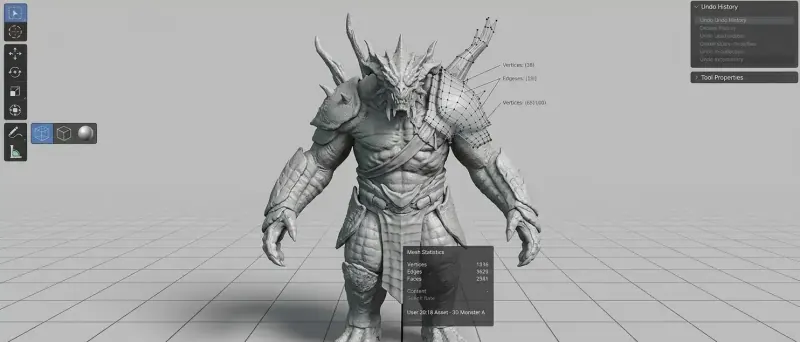
Clean topology follows the natural flow of a surface (muscle and joint lines on a character, panel lines on a vehicle) and avoids uneven or overly dense polygon distributions. Bad topology can look correct in a still render and then break visibly the moment the model is animated or the surface is smoothed. This is one of the most common issues that separates an amateur model from a production-ready one.
Low-poly vs. high-poly
- Low-poly models use a limited number of polygons, keeping file size and render/computation cost low. They are the standard for video games, AR/VR, and any real-time or web-based 3D viewer, where a strict polygon budget is often part of the technical spec.
- High-poly models carry far more polygon detail: fine wrinkles, fabric weave, machined edges. They are used for film-quality still renders, or as a detailed source model from which fine surface detail is "baked" down onto a low-poly version as a texture map, giving a light real-time asset the visual richness of a heavy one.
What are UVs and why do they matter for a 3D model?
UVs are the 2D coordinate map that unfolds a 3D model's surface flat, the way a world map unfolds the globe, so that 2D textures and materials can be applied accurately onto its 3D surface. Without a correct UV layout, textures stretch, tile incorrectly or land in the wrong place. UV unwrapping is typically done once modeling is complete and before texturing begins, since it directly determines how detail, color and material maps sit on the finished surface.
Which software is used for 3D modeling?
There is no single best 3D modeling software: the right tool depends on the type of object, the industry, and the required precision. General-purpose and organic modeling, CAD-precise engineering, and digital sculpting each have their own dominant tools, and many studios use several together in one pipeline.
| Software | Best suited for |
|---|---|
| Blender | General-purpose modeling, free and open-source, widely used across industries |
| Autodesk Maya / 3ds Max | Character and hard-surface modeling for games, film and animation |
| Maxon Cinema 4D | Motion graphics, product visuals, easier learning curve |
| ZBrush (Maxon) | Digital sculpting for characters, creatures and organic detail |
| Rhino | Free-form and precise surface modeling, industrial design |
| SolidWorks / Autodesk Fusion | Parametric CAD for mechanical parts and manufacturable products |
The software matters less than the modeler's command of topology, proportions and the tool appropriate to the object. When you evaluate a freelance 3D modeler, judge the work, not the software listed on their profile.
What file formats are used for 3D models?
3D models are exchanged in different formats depending on the destination: general-purpose formats for cross-software compatibility, web-optimized formats for real-time delivery, and CAD formats for engineering precision. Choosing the right one before a project starts avoids costly re-exports later.
| Format | Typical use |
|---|---|
| OBJ | Simple, widely supported mesh and material exchange between software |
| FBX | Meshes, materials and animation; a de facto standard between DCC tools and game engines |
| glTF / GLB | Web and real-time delivery; open standard ratified by Khronos as ISO/IEC 12113:2022 |
| STEP | Exact CAD geometry exchange between engineering tools, based on ISO 10303 |
| USD | Large, composable scenes for film and real-time pipelines, open-sourced by Pixar |
For web viewers, product configurators and AR, GLB is now the practical default, the same format covered in our guide to 3D product visualization. For engineering handoffs, ask specifically for STEP or the native CAD file rather than a mesh export, since a mesh cannot be edited back into parametric CAD.
Where is 3D modeling used?
3D modeling is the starting point of nearly every industry that produces visual or manufactured 3D content: video games, film and animation, product design and manufacturing, architecture, e-commerce, and virtual/augmented reality. Each industry has different priorities for the same underlying skill.
- Video games: characters, environments, props and weapons, almost always built and optimized as low-poly assets for real-time engines, as covered in our article on 3D art for video games.
- Architecture: buildings and interiors modeled from plans or CAD files, the base for architectural visualization and 360° virtual tours.
- Product design and e-commerce: digital prototypes and product replicas used for renders, configurators and manufacturing feasibility, well before physical stock exists.
- Film and animation: high-detail organic and hard-surface models built for close-up shots, feeding directly into 3D animation.
- Engineering and manufacturing: precise, parametric CAD models that must respect real-world tolerances so parts fit and function.
How long does 3D modeling take and what drives the cost?
There is no fixed price or duration for 3D modeling: both depend on the object's geometric complexity, the level of surface detail required, whether usable reference material already exists, and the deliverable format. Rather than quoting a figure, it is more useful to understand what actually drives the cost up or down.
- Reference quality. Clean CAD files or dimensioned drawings save significant modeling time compared to starting from photos alone or a vague description.
- Geometric complexity. A simple hard-surface object is quick; a mechanical assembly with dozens of interacting parts, or a highly detailed organic character, is not.
- Level of detail required. A low-poly game asset and a film-quality high-poly model of the same object are very different amounts of work.
- Topology requirements. A model that must be animated or deformed (a character, a rigged mechanism) needs carefully built topology, which takes longer than a static display model.
- Revision rounds. How many rounds of feedback and correction are included changes both the timeline and the price.
- Deliverable formats. Needing the model in several formats (say, a high-poly source plus an optimized GLB for the web) adds work beyond the base model.
How do I brief a freelance 3D modeler?
A strong brief gives the modeler everything needed to build accurate geometry and to know exactly what "finished" looks like: multi-angle references, real dimensions, the model's intended use, required file formats, and any topology constraints. The clearer the brief, the more comparable the quotes you receive and the fewer revision rounds you will need.
Here is the checklist we recommend to clients on Hi 3D:
- References from multiple angles: photos of every side of the object, or CAD files and technical drawings if available; a single front photo is rarely enough.
- Real dimensions: overall measurements, and ideally a scale reference in any photo.
- Intended use: a still render, a real-time application, 3D printing, or CAD for manufacturing each imply different techniques and tolerances.
- Topology constraints: if the model must be animated or run in a game engine, state the polygon budget and whether it needs a rig-ready structure.
- Required formats: OBJ, FBX, glTF/GLB, STEP or native software files, plus whether you need the source scene file.
- Revision rounds: agree upfront on how many correction passes are included at which stage (blockout, refined mesh, final geometry).
How do I evaluate a 3D modeler's portfolio?
Ask to see wireframe or topology views, not just final renders: a shaded image can hide messy geometry, while a wireframe immediately shows whether edge flow is clean and polygon density is even. Look for work on objects similar to yours (organic vs. hard-surface, product vs. environment scale), and check consistency across a full project rather than a single hero shot. On Hi 3D, you can browse verified freelance 3D artists and filter by specialty before comparing portfolios side by side.
3D modeling is where every 3D project's quality is decided, long before texturing, lighting or animation enter the picture. Whether you need a single product asset or a full environment, post your project on Hi 3D to find a freelance 3D modeler suited to your object and your industry.
Frequently asked questions
What is 3D modeling in simple terms?
3D modeling is building a three-dimensional digital object out of points, edges and surfaces using specialized software, without yet adding color, material or lighting. The result, called a mesh or a solid model depending on the technique, is the geometric base that texturing, rigging, animation and rendering are later applied to. Almost every 3D image, game asset or manufactured part starts as a 3D model.
What is the difference between low-poly and high-poly models?
A low-poly model uses relatively few polygons, so it is lightweight and fast to render or animate in real time, at the cost of surface detail; it is standard for video games, AR and web viewers. A high-poly model uses far more polygons to capture fine detail such as pores, fabric weave or machined edges, and is used for film-quality renders or as the source that detail gets baked down from onto a low-poly game asset.
Which software is used for 3D modeling?
Common choices include Blender (free, general-purpose), Autodesk Maya and 3ds Max (games, film, animation), Maxon Cinema 4D (motion graphics and product visuals), Pixologic/Maxon ZBrush (digital sculpting for characters and organic detail), and CAD-oriented tools such as Rhino, SolidWorks and Fusion for precise, manufacturable geometry. The right choice depends on the project's shapes and destination, not on any one tool being universally best.
What file formats are used to exchange 3D models?
OBJ and FBX are widely supported general-purpose formats for meshes, materials and, for FBX, animation. glTF and its binary form GLB are the open standard for web and real-time delivery, ratified by Khronos as ISO/IEC 12113:2022. STEP (ISO 10303) carries exact CAD geometry between engineering tools. USD, open-sourced by Pixar, is used for large scenes in film and increasingly in real-time pipelines.
How much does 3D modeling cost and how long does it take?
There is no fixed price or timeline: cost and duration depend on the object's complexity, the level of surface detail required, whether accurate reference files (photos, CAD, drawings) exist, how many revision rounds are included, and the deliverable format. Rather than looking for a fixed rate, ask each 3D modeler for a quote based on your specific references and required files.
How do I brief a freelance 3D modeler?
Provide clear references from multiple angles (photos, CAD files or drawings if you have them), real dimensions, the intended use of the model (still render, real-time, 3D printing, CAD), the required file formats, and any topology constraints such as a polygon budget for a game engine. State the number of revision rounds you expect up front so the quote matches the work.
The Hi 3D Team
Hi 3D connects companies with verified freelance 3D artists worldwide. Our team writes practical guides drawn from the projects we see on the platform every day.
Need a 3D artist for your project?
Browse verified freelance 3D artists, compare portfolios and get your project started on Hi 3D.